

Every week we talk with HR leaders and team leads who already run on Microsoft Teams and are asking the same question: is the Praise feature we already have enough, or do we need a dedicated recognition program? This guide compares Microsoft's Praise feature in Teams (part of Microsoft Viva Insights, and what most people search as ‘Microsoft Praise’) with Matter, which also runs inside Teams. Facts were verified in August 2026 against Microsoft's own documentation and licensing pages, each cited inline. Matter publishes this guide, so read our take on our own product with that in mind, and confirm licensing details with Microsoft before you decide.
How we researched this comparison
We build Matter, which runs inside Microsoft Teams, and we use Teams every day. In September 2026 we sent Praise in our own Microsoft 365 tenant and reviewed the compose flow, the sent card, and the free Viva Insights praise views hands-on. For licensing and administration, we relied on Microsoft's public documentation, plan pages, and Message Center notices, each cited inline with the date we verified it, and we drew on conversations with teams that evaluated Praise before choosing a dedicated recognition platform. We have not used Praise Trends or the Teams admin center configuration hands-on. Every claim is sourced to what we saw in the product, Microsoft's own materials, or Matter's published data; facts were last verified in August and September 2026.
The verdict in 30 seconds: Microsoft Praise vs. Matter
This is not Teams vs. Matter. Both live inside Microsoft Teams. Praise is a feature; Matter is a recognition program. The question is whether your team needs the program.
Choose Praise if occasional, unmeasured appreciation inside Teams chats is all your team needs. It costs nothing beyond the Microsoft 365 licenses you already own, it works today, and there is nothing to procure or install.
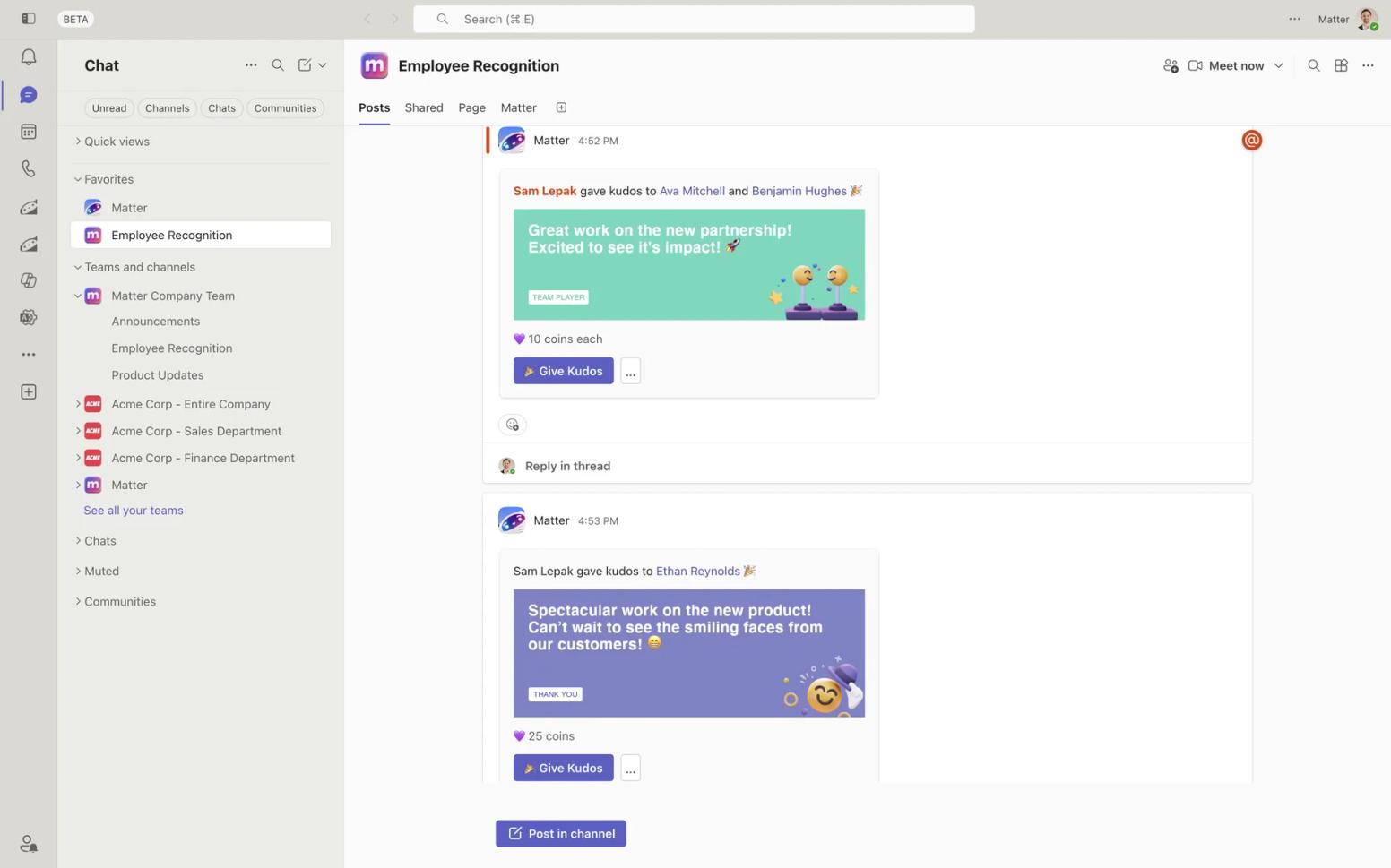
Choose Matter if you want recognition to become a program: kudos tied to your company values, rewards in 200+ countries, automated birthdays and work anniversaries, surveys, and reporting your HR team can actually open, all without leaving Teams. Matter is a Teams-first and Slack-first employee recognition, rewards, and surveys platform, rated 5.0 across 1,476 ratings on the Microsoft Teams app store, with a Free plan for unlimited users and a two-minute setup.
The honest bottom line: Microsoft Praise is a thank-you card built into Teams. It is genuinely free, genuinely native, and genuinely limited: no rewards, no custom values badges, no celebrations, and no way for HR to see whether anyone is using it. Keep Teams. Graduate from Praise when your team outgrows it.
A quick comparison between Microsoft Praise and Matter
The summary first, then a closer look at recognition, rewards, and surveys.
| Matter | Microsoft Praise | |
|---|---|---|
| What it is | Recognition, rewards, and surveys platform that runs inside Teams (and Slack) | Built-in feature of Microsoft Teams and Viva Insights |
| Cost | Free plan for unlimited users, then $1 to $5 per user/month, billed annually (published) | No extra cost to send praise with any Teams license; personal Praise Trends need Viva Insights at $4 per user/month |
| Teams app store | 5.0 (1,476 ratings) | Built in; no marketplace listing |
| Custom badges or values | Yes, custom kudos tied to company values | No; 14 fixed titles |
| Rewards | 10,000+ options across 200+ countries | None |
| Reporting for HR | Analytics and reporting (Basic plan and up) | None at any license tier |
| Best for | Teams that want a measurable recognition program without leaving Teams | Small teams that want occasional thank-yous with zero budget |
Recognition
| Matter | Microsoft Praise | |
|---|---|---|
| Where it lives | Teams (and Slack) channels and chats; no separate login | Teams compose box, the Viva Insights app, and profile cards in Teams and Outlook |
| Recognition format | Designed kudos greeting cards tied to company values | One of 14 fixed titles plus a note of up to 500 characters |
| Custom kudos or badges | Yes | No (custom badges withdrawn February 2022) |
| Weekly ritual | Feedback Friday™ (U.S. Patent No. 12,199,935) | Self-set reminders and suggestions; no team-wide cadence |
| Automated birthdays & anniversaries | Yes | No |
| Who can see the data | Individuals, managers, and admins (Basic plan and up) | The individual only: personal feed and six-month history |
| Setup | About 2 minutes from the Teams app store; no HRIS required | Already on; admins allow or block it in the Teams admin center |
Rewards
Praise has no rewards capability of any kind; Microsoft's Praise documentation describes titles and notes only (admin and support docs, verified August 2026). That is by design: Praise is appreciation, not incentive.
| Matter | Microsoft Praise | |
|---|---|---|
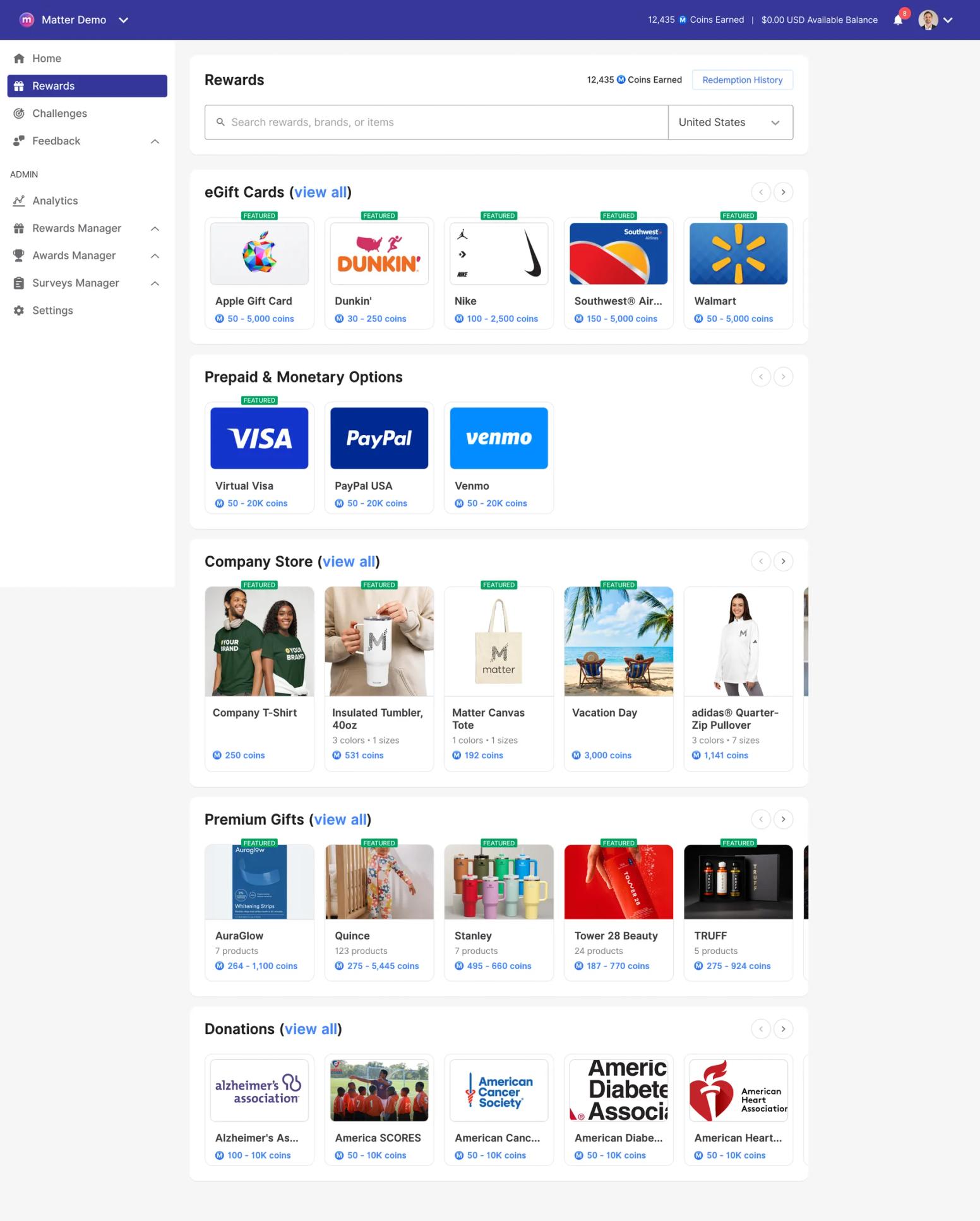
| Gift cards | Yes, 10,000+ options, 200+ countries | None |
| Premium / physical gifts | Yes | None |
| Charitable donations | Yes | None |
| Prepaid / monetary payouts | Yes | None |
| Company swag | Yes (print-on-demand or self-fulfillment) | None |
| Points or coin economy | Weekly-resetting give-coins; earned coins never expire | None; praise carries no value or balance |
| Reward funding options | 0% ACH prepay; 3.5% card prepay; pay-as-you-go card 5% + $0.35 | Not applicable |
If a thank-you in a chat is the whole goal, no rewards is fine. If you want recognition to carry weight, the preference data is worth knowing: according to Matter's 2026 survey of 1,021 U.S. employees, 57% preferred cash rewards, 41% preferred paid time off, and 30% preferred gift cards (see Matter's research). Matter's rewards include eGift cards, prepaid cards, premium gifts, donations, and company swag, all redeemed inside Teams.
Surveys
| Matter | Microsoft Praise | |
|---|---|---|
| Pulse surveys + eNPS | Yes (Surveys add-on) | Not part of Praise |
| Onboarding surveys | Yes | Not part of Praise |
| Custom surveys | Yes | Not part of Praise |
| Where surveys live | Delivered natively in Teams and Slack | Separately licensed Viva Glint and Viva Pulse |
| Pricing | $2 per user/month, billed annually, added to Pro (Pro + Surveys totals $5) | Viva Workplace Analytics and Employee Feedback bundle at $6 per user/month |
Praise itself has no survey capability. In Microsoft's stack, engagement measurement lives in Viva Glint and Viva Pulse, sold in the Viva Workplace Analytics and Employee Feedback bundle at $6 per user/month (per Microsoft's Viva pricing page, verified August 2026). Those are capable products and not competitors to Praise; they are simply where surveys live inside Microsoft's tools. Matter's pulse, eNPS, onboarding, and custom surveys are delivered in the same Teams channels where kudos happen, for $2 per user/month, billed annually, on top of Pro.
What Microsoft Praise is designed for, and where it stops
A naming note first, because it trips people up. There is no product officially called ‘Microsoft Praise.’ Microsoft's admin documentation calls it the Praise app in Microsoft Teams and describes it this way: “The Praise app in Microsoft Teams helps users show appreciation to members of your organization or classroom” (Microsoft Learn, manage the Praise app, doc updated May 2026, verified August 2026). The same feature also lives inside the Viva Insights app in Teams as Praise in Viva Insights. Viva Engage (formerly Yammer) has a separate, unconnected post type also called Praise; this guide covers the Teams and Viva Insights feature.
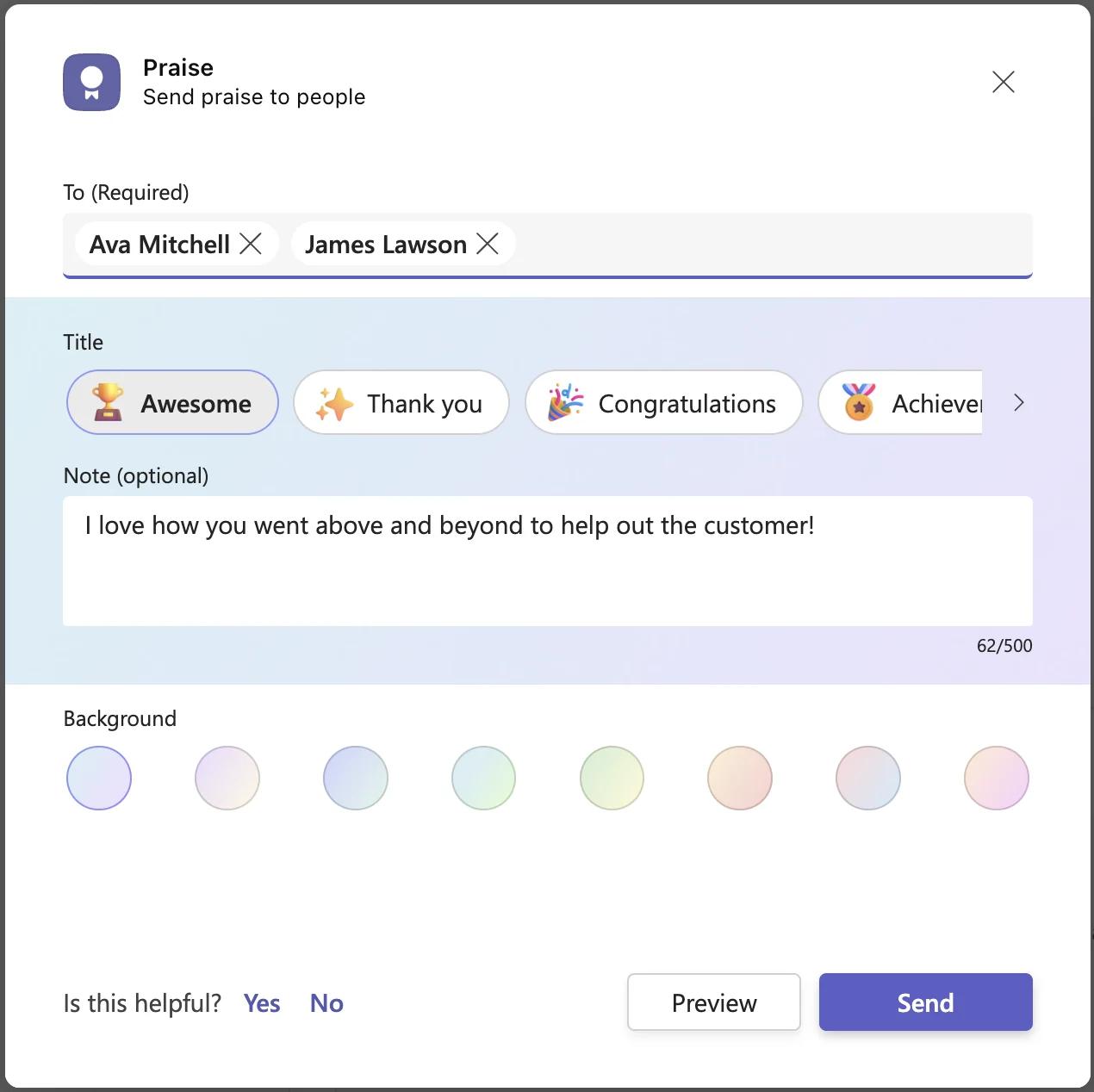
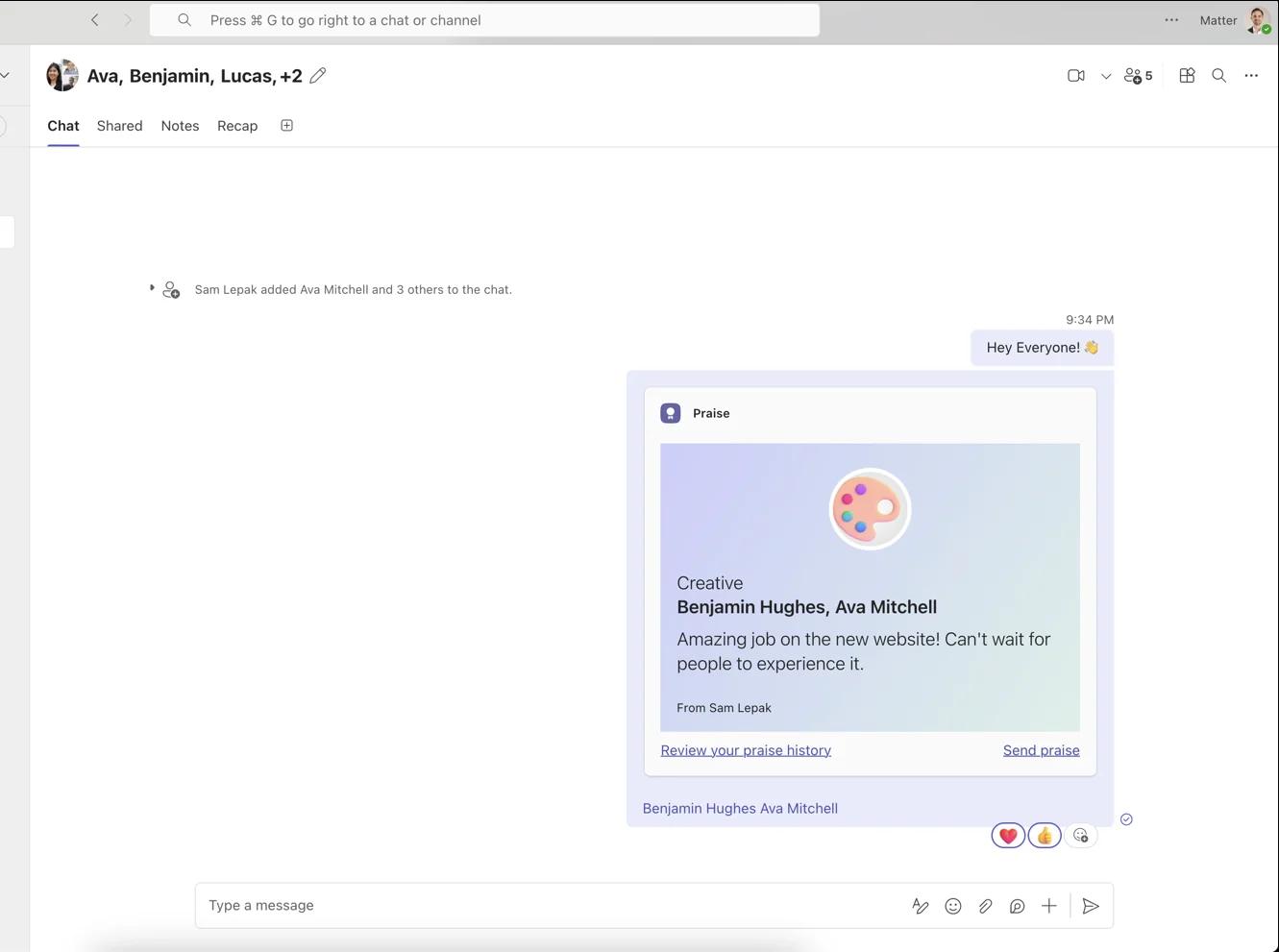
How sending works. In a chat or a standard channel, you open the actions menu in the compose box, choose Praise, pick a title (the default is Awesome; the strip scrolls sideways to show all 14), add an optional note of up to 500 characters, preview, and send (Microsoft Support, send Praise to people in Microsoft Teams, verified August 2026). Microsoft's admin doc says users pick from 14 titles and can praise several people at once. We checked the full set in-product in September 2026: Awesome (the default), Thank you, Congratulations, Achiever, Problem solver, Courage, Team player, Kind heart, Optimism, Creative, Leadership, Inclusive, Coach, and Growth, each paired with a fixed emoji. The compose panel has four fields, recipients, title, an optional note with a live 500-character counter, and a choice of eight background colors, which is the only per-praise customization available. The praise appears in the chat or channel, in the recipient's activity feed, and, unless they turn it off, as a highlight on their profile card in Teams and Outlook (Microsoft 365 Message Center notice MC500903, January 2023).
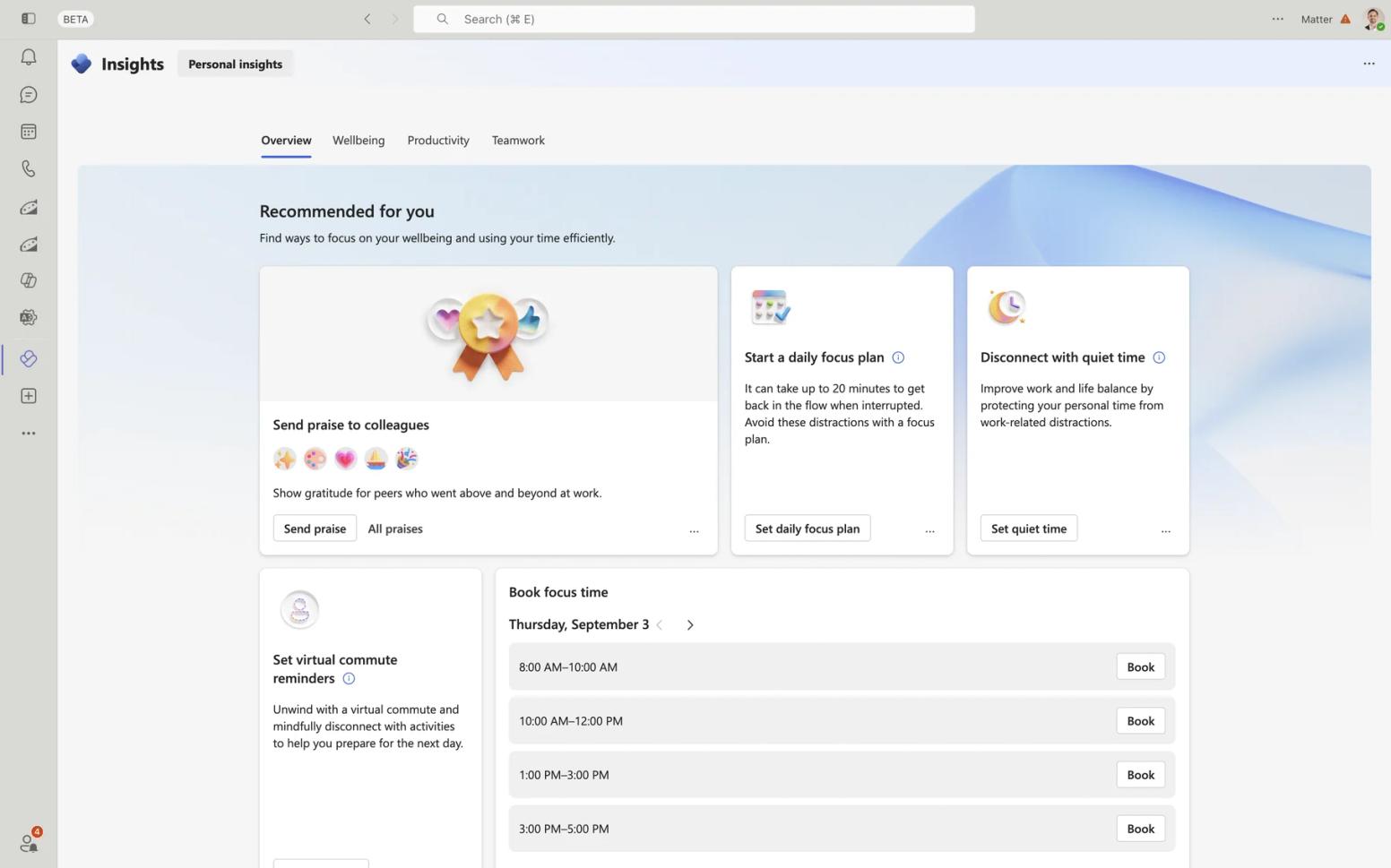
What the Viva Insights app adds, free. Each person gets a personal praise feed, a six-month history of praise sent and received (which requires an Exchange Online mailbox), self-scheduled praise reminders, and suggestions of people to praise, including nudges to managers about team members they have not praised in a while (Microsoft Support, Praise in Viva Insights, verified August 2026). That is a real, if light, habit engine, and Praise deserves credit for it.
What admins control. The entire admin surface is allow or block: Teams admin center, Manage apps, Praise, status toggle, with per-user control through app permission policies (Microsoft Learn, manage the Praise app, verified August 2026). The Give Praise toggle that older tutorials describe inside Teams messaging policies is gone; Microsoft's current messaging policies documentation lists no praise-related setting (verified August 2026). There are no admin settings for badge sets, values, frequency, budgets, or moderation. That one-toggle simplicity is worth matching: Matter's setup for IT and Teams admins also adds no new logins or provisioning work, because membership syncs from Teams.
Where it stops. Each of these is a documented boundary, not a criticism:
- No custom badges. Microsoft offered tenant-specific custom badges from September 2020 and withdrew them in February 2022 (Message Center notice MC329432). The current admin documentation has no custom-badge settings.
- No org-wide, manager, or admin reporting, at any price. Microsoft describes Praise Trends as surfacing data privately (MC448356, November 2022), and Microsoft Q&A threads from 2022 through 2024 confirm there is no admin or HR report of praise activity, even for a Global Administrator.
- No rewards, celebrations, or surveys. Microsoft's Praise documentation describes titles and notes only; surveys live in separately licensed Viva products.
- Standard channels only. Praise is not available in private channels (Microsoft Support responses in Microsoft Q&A, 2023 and 2024), and external or guest users can receive praise but not send it (Microsoft Q&A, 2023, community answer).
What we noticed using Praise
Sending one is quick. The compose panel has four fields: recipients, a title, an optional note with a live 500-character counter, and a background color. The titles sit in a strip that scrolls sideways, so you see a handful at a time and page through the rest, with Awesome selected by default. A preview step shows the finished card before it goes out. Once sent, the card lands in the chat under the sender's name with the emoji, title, recipients, and note, plus two links: ‘Review your praise history’ and ‘Send praise’. The background color is the only thing you can customize.
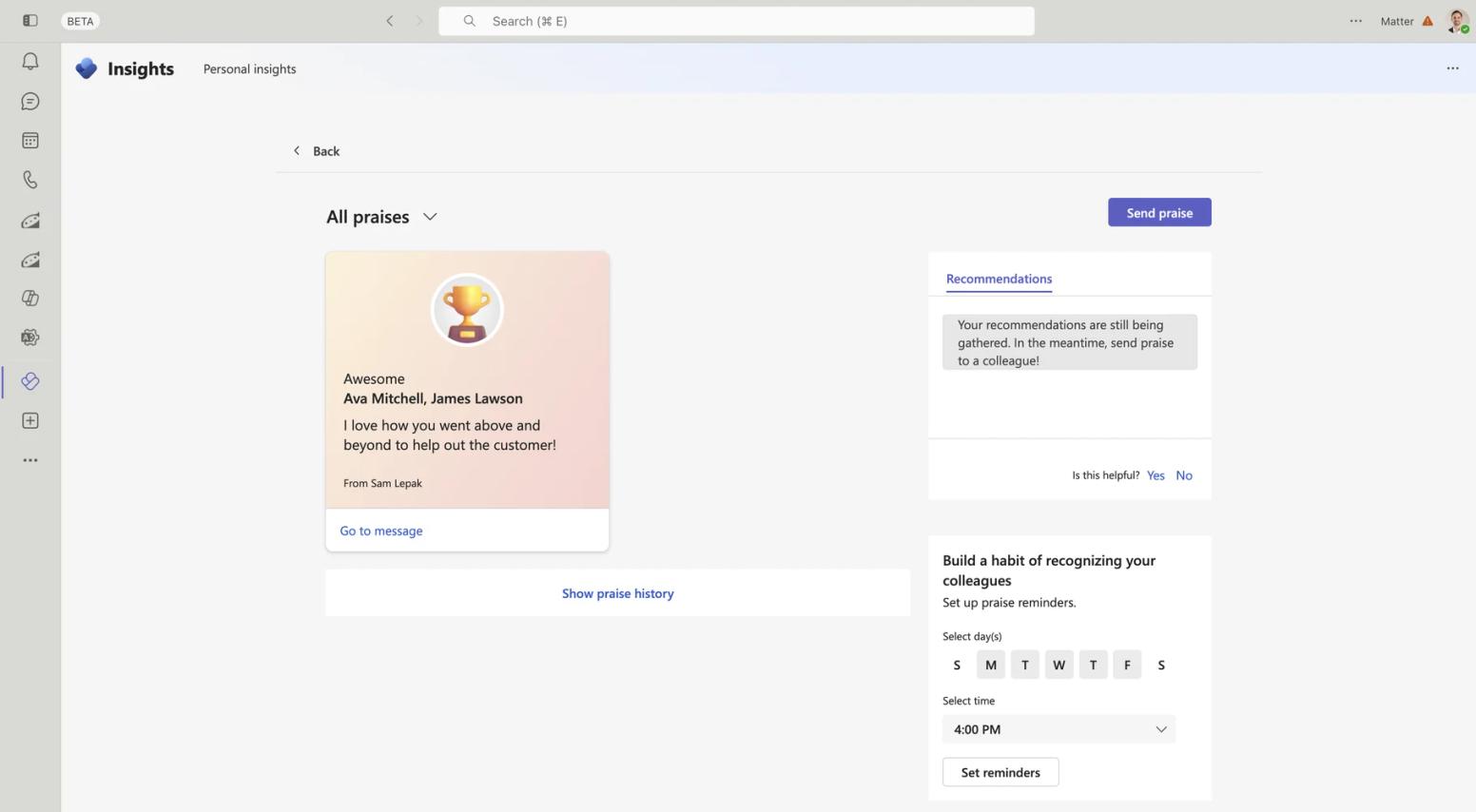
The free Viva Insights app is where the rest lives. An ‘All praises’ feed lists the praise you have received, each with a ‘Go to message’ link back to the original chat, and a link to your praise history. A reminders panel lets you toggle days of the week and pick a time, with 4:00 PM shown by default. On our fresh tenant, the Recommendations pane said our recommendations were still being gathered.
What that adds up to: Praise is a pleasant, fast way to send a titled thank-you inside Teams. Everything a program needs beyond that, values, rewards, celebrations, and reporting, is simply not in the product. That is a design choice rather than a flaw, and it is the line this whole comparison turns on.
Microsoft Praise licensing vs. Matter's pricing: what each actually costs
Praise has no pricing page, so the honest comparison is a licensing matrix. Every row comes from Microsoft's own documentation, verified in August 2026; Microsoft's docs change often, so re-check before you budget.
| Praise capability | Licensing | Microsoft source (verified August 2026) |
|---|---|---|
| Send praise in chats, group chats, and standard channels (14 titles, 500-character note, multiple recipients) | Included with Teams on any commercial Microsoft 365 or Office 365 plan, including frontline F1 and F3 | Manage the Praise app (Microsoft Learn);Microsoft Viva service description |
| Praise feed, suggestions, and manager nudges | Included, via the free Viva Insights app in Teams, for Exchange Online users | Praise in Viva Insights (Microsoft Support); MC448356 |
| Self-scheduled praise reminders | Included, via the free Viva Insights app | Configure your app settings in Viva Insights (Microsoft Support) |
| Personal praise history (six months) | Included, but requires an Exchange Online mailbox; on-premises mailboxes are not supported | Praise in Viva Insights (Microsoft Support) |
| Praise highlights on Teams and Outlook profile cards | Included; users can turn visibility off | MC500903 |
| Praise Trends (personal analytics: counts, top fans, top praises) | Requires a Viva Insights subscription: $4 per user/month standalone with an annual commitment, or the $6 or $12 Viva bundles | Praise in Viva Insights (Microsoft Support);Viva Insights plan page |
| Share a copy of a praise with a person or distribution list | Requires a Viva Insights subscription | MC489162 |
| Custom badges | Not available at any price; withdrawn February 2022 | MC329432 |
| Org-wide, manager, or admin praise reporting | Not available at any price; praise data is personal by design | MC448356; Microsoft Q&A |
Two notes. First, Microsoft's environment-requirements documentation says a Viva Insights service plan is also included in a Microsoft Copilot subscription (Viva Insights environment requirements, doc updated May 2026, verified August 2026; the rollout was announced in MC1009917 and completed in April 2025). Microsoft's docs do not state in so many words that this plan unlocks Praise Trends, so confirm with your licensing admin before assuming it does. Second, and more important: custom values badges, rewards, and org reporting are not behind a paywall. They do not exist in Praise. The only paid praise features are personal trends and share-a-copy, and both still show your praise data to no one but you.
Matter publishes its pricing, and hasn't raised prices in 8 years:
- Free: Matter's Free plan is for unlimited users, including kudos recognition, the kudos template library, and Feedback Friday™.
- Basic: $1 per user/month, billed annually, adding celebrations, custom kudos tied to company values, and analytics and reporting.
- Pro: $3 per user/month, billed annually, adding rewards (10,000+ eGift cards and premium gifts across 200+ countries), company swag (print-on-demand or self-fulfillment), and challenges and incentives.
- Surveys add-on: $2 per user/month, billed annually, adding pulse, eNPS, onboarding, and custom surveys (Pro + Surveys totals $5 per user/month).
- Enterprise: custom pricing, adding Enterprise Grid setup, manager management and custom reporting, HRIS platform integration, and shared channel support.
See Matter's pricing for the current plan details.
What it actually costs: a worked example for a 100-person team
- Microsoft Praise: nothing extra. Sending praise is covered by the Teams licenses you already pay for. If you want each person to see their own Praise Trends, Viva Insights standalone is $4 per user/month with an annual commitment, or $4,800 per year for 100 people, and HR still gets no report of who is recognizing whom.
- Matter Free: nothing. Unlimited users, kudos, and Feedback Friday™ inside Teams.
- Matter Basic ($1 per user/month, billed annually): $1,200 per year, adding custom values kudos, automated celebrations, and the analytics and reporting Praise does not offer at any price.
- Matter Pro ($3 per user/month, billed annually): $3,600 per year, adding rewards and company swag, plus your rewards budget. Rewards can be prepaid via ACH or bank transfer at a 0% processing fee, prepaid with a credit card at 3.5%, or funded pay-as-you-go by credit card (5% plus $0.35 per transaction).
- Matter Pro + Surveys ($5 per user/month, billed annually): $6,000 per year for recognition, rewards, celebrations, reporting, and surveys in one tool.
Put plainly: a team that pays for Viva Insights to get personal Praise Trends spends more per user than Matter Pro and gets no rewards, celebrations, or HR reporting for it. A team that never wants those things should stay on Praise and spend nothing. Both answers are correct for different teams.
Where Microsoft Praise wins
Praise is a good free feature, and for some teams it is the right answer. Its strengths are real:
- It is free with licenses you already own, including frontline F1 and F3 plans, per Microsoft's Viva service description. There is no new line item, ever, for basic sending.
- Zero procurement. No vendor review, security questionnaire, data processing agreement, or app approval. It ships inside your Microsoft 365 agreement, and for a 20-person team that can be the whole decision.
- It is truly native. Praise lives in the Teams compose box and on the profile card in Teams and Outlook. No recognition vendor, Matter included, puts recognition on the Microsoft profile card.
- It has a light habit engine. Self-set reminders and suggestions, including nudges to managers about team members they have not praised recently, are free through the Viva Insights app.
- Privacy by design. Praise data is personal, and each person controls whether their highlights are visible. Organizations that dislike leaderboards may prefer that.
- Microsoft maintains it. The admin documentation was refreshed in May 2026 and no retirement has been announced.
If your team is small, has no recognition budget, does not need rewards or reporting, and already thanks each other freely, Praise is enough. Use it and do not overthink it.
Why teams graduate from Praise to Matter
Praise is usually the on-ramp: it proves a team wants recognition. The move to a program tends to follow a specific trigger. In conversations with teams that evaluated Praise before moving to a dedicated platform, two limitations came up repeatedly: every Praise post notifying the whole company, and the lack of reporting and badge customization. Both match what Microsoft's documentation shows, and they map to the moments we see most often:
- HR asks whether anyone is using it. There is no answer. Praise has no participation report at any license tier, the most common thread in Microsoft Q&A discussions about Praise. Matter's analytics and reporting (Basic plan and up) show who is recognizing whom, how often, and against which values, in a view built for HR and People Ops.
- Leadership wants recognition tied to company values. Praise offers 14 fixed titles; custom badges were withdrawn in February 2022. Matter's custom kudos map to your values. This is the difference that shows up most clearly in the data: according to The Recognition Habit, Matter's 2026 Benchmark Report, teams that create their own kudos types (e.g., company values) recognize 4.6x more per person than teams on defaults and are 3x more likely to be active at all; where custom types exist, 65% of recognition uses one.
- The team wants recognition to become a rhythm. Praise reminders are self-set and individual. Matter's Feedback Friday™ is a team-wide weekly ritual, and it is patented (U.S. Patent No. 12,199,935). The 2026 Benchmark Report found that teams that build recognition around a weekly ritual give about 2.5x more recognition per member than ad hoc teams, and roughly 8 in 10 ritual teams stay active in nearly every month.
- Someone asks for rewards. Praise has none. Matter Pro adds 10,000+ reward options across 200+ countries, redeemed inside Teams.
- Someone asks about birthdays and anniversaries. Praise does not automate them. Matter's automated celebrations handle both, with optional rewards, and dates can be collected self-serve without an HRIS project.
- Part of the company runs on Slack. Praise exists only inside Microsoft's surfaces. Matter runs natively in both Teams and Slack, so a mixed organization gets one program.
One honest note in the other direction: some Matter reviewers on G2 find the default notification cadence chatty, though settings allow tuning channels and reminders. If whole-company pings are what pushed you off Praise, set up your kudos channels deliberately in the first week.
Matter's features inside Microsoft Teams
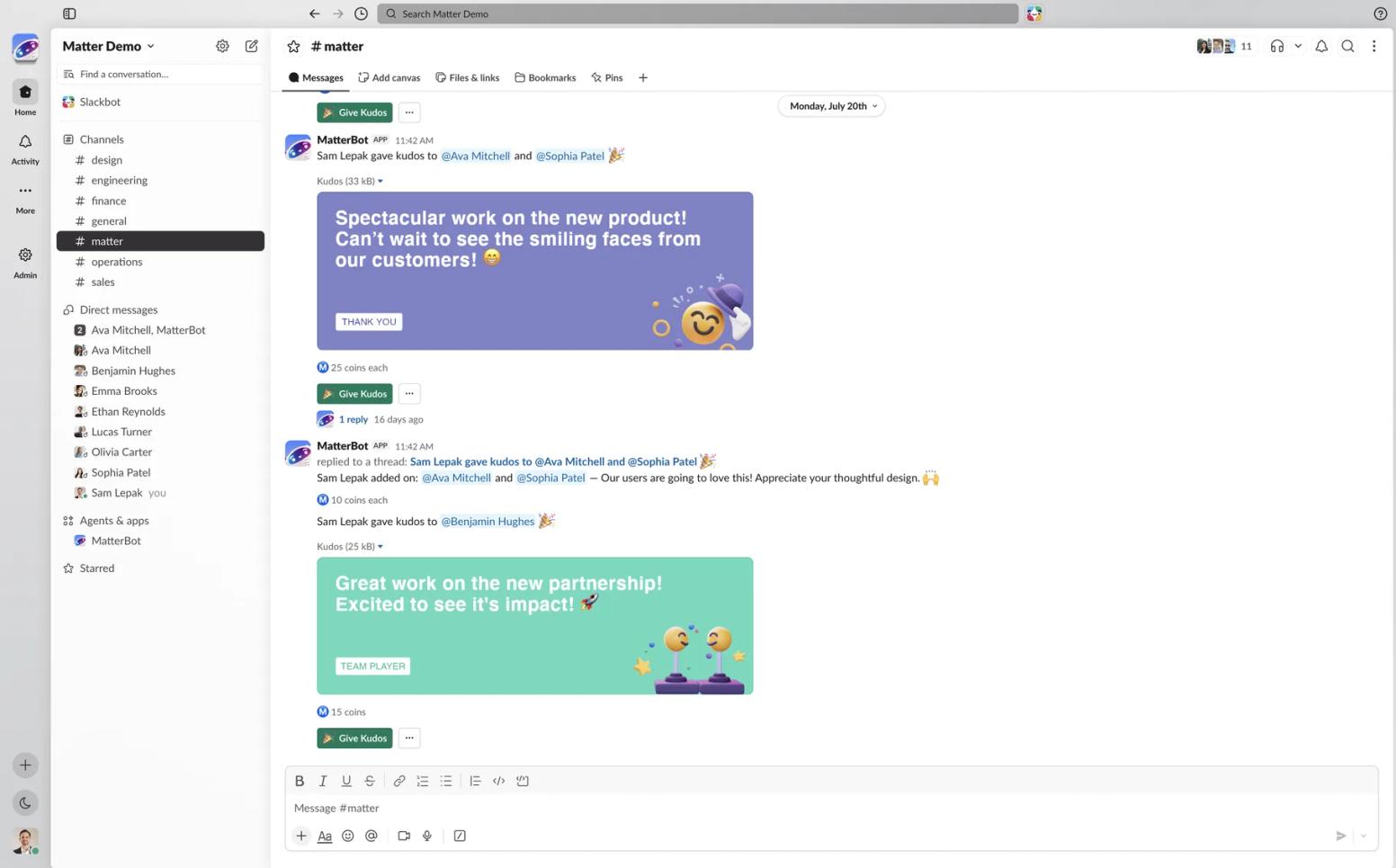
Matter is not a separate destination. It installs from the Teams app store in about two minutes, pulls your team directly from Teams so there is no separate login and no HRIS required to start, and works wherever Teams does, including mobile. Matter's Teams app is also listed in the Microsoft 365 App Certification program, which publishes its data-handling attestation.
- Kudos where you work: designed greeting cards tied to your company values, sent from Teams, with give-coins attached. Kudos can be deleted and resent if you make a mistake.
- Feedback Friday™: an automated weekly recognition ritual for the whole team, not a personal reminder.
- Weekly coin system: give-coins reset each week so recognition stays frequent; earned coins never expire. Coin monitoring (the “too much love” rule) caps how many coins one person can send another per period, so recognition stays fair.
- Automated celebrations: birthdays and work anniversaries, with optional rewards.
- Rewards: 10,000+ options across 200+ countries, plus company swag (print-on-demand or self-fulfillment).
- Surveys: pulse, eNPS, onboarding, and custom surveys delivered in Teams.
- Analytics and reporting: participation, values, and trends that admins and managers can open, on the Basic plan and up.
- Microsoft Copilot: Matter works with Copilot, so people can surface recognition, celebrations, rewards, and survey insights in natural language.
Matter offers 24/7 customer support and a 14-day free trial of the full product with no credit card. On G2 it is rated 4.7 across 1,186 reviews. One example from Matter's customer stories: McInnis & Holloway sent more than 2,000 kudos and reached over 80% engagement across all employees in under two months (Jeff Hagel, President).
How to graduate from Praise to Matter without leaving Teams
There is nothing to migrate: Praise has no points, balances, or program data to export, and your team keeps using Teams exactly as before. Graduating is a rollout, not a switch.
- Install Matter from the Teams app store. Matter's Free plan is for unlimited users, takes about two minutes, and needs no credit card. Your team syncs from Teams automatically, with no HRIS project and no separate login.
- Choose your kudos channels. Decide where recognition appears, one company-wide channel or team channels, and set notification preferences. This is the step that solves the everyone-gets-pinged problem teams describe with Praise.
- Add your company values as custom kudos. Praise's 14 titles are fixed; your values are not. This is the single change with the biggest effect on how much recognition happens.
- Turn on Feedback Friday™ and celebrations. The weekly ritual and automated birthdays and anniversaries run on their own once enabled. Add rewards on Pro when the budget is ready.
- Announce it, and decide what to do with Praise. A short message from a leader: what is changing, where kudos now live, and when the first Feedback Friday is. You do not have to turn Praise off. Some teams keep it for quick, casual thanks in chats; others ask their Teams admin to block the Praise app so there is one place to look.
Typical timeline: hands-on setup is one to two hours with the right permissions, and most teams under 100 people are fully live within a day or two. The 2026 Benchmark Report found that almost half of teams (46%) send their first recognition within 15 minutes of setup, identical on Slack and Teams, and on Teams two-thirds of the team onboards within the first hour.
Frequently asked questions about Microsoft Praise vs. Matter
Is Praise in Microsoft Teams free?
Yes, for sending. Sending praise is included with Teams on any commercial Microsoft 365 or Office 365 plan, including frontline F1 and F3, per Microsoft's documentation verified in August 2026. The only paid praise features are personal Praise Trends and share-a-copy, which require a Viva Insights subscription at $4 per user/month standalone.
Can you customize Praise badges in Microsoft Teams?
No. Praise offers 14 fixed titles. Microsoft added custom badges in September 2020 and withdrew the capability in February 2022 (Message Center notice MC329432). The current admin documentation contains no custom-badge settings, and custom badges are not available at any license tier.
Can managers or HR see all Praise sent in the organization?
No. Praise data is personal by design. Each person sees their own feed and six-month history, and Praise Trends (with a Viva Insights subscription) shows personal analytics only. Microsoft Q&A threads confirm there is no admin or HR report of praise activity, even for a Global Administrator, as of August 2026.
What is the difference between Microsoft Praise and Matter?
Praise is a free built-in Teams feature for sending a titled thank-you note. Matter is a recognition program that runs inside Teams: custom kudos tied to company values, a weekly Feedback Friday™ ritual, rewards in 200+ countries, automated celebrations, surveys, and reporting for HR. Praise suits occasional appreciation; Matter suits teams that want recognition to be measurable and consistent.
Do we have to leave Microsoft Teams to use Matter?
No. Matter installs from the Microsoft Teams app store in about two minutes and runs inside Teams, with no separate login. It is rated 5.0 across 1,476 ratings there. Your team keeps using Teams exactly as before; recognition simply gains values, rewards, celebrations, and reporting.
Can we keep using Praise alongside Matter?
Yes. Nothing needs to migrate, because Praise holds no points or balances. Some teams keep Praise for quick thanks in chats and run their recognition program in Matter; others ask their Teams admin to block the Praise app so there is a single place for recognition. Either approach works.
Microsoft Praise vs. Matter: the bottom line
Praise did its job if your team is already thanking each other in Teams. When you need recognition to reflect your values, carry rewards, mark birthdays and anniversaries, and show up in a report, Matter gives you the program without anyone leaving Teams. Start on the Free plan, no credit card, and see it running this week.
Related reading: Microsoft Praise alternatives, Microsoft Praise competitors, HeyTaco vs. Matter, Nectar vs. Matter, Bonusly vs. Matter, and the full Matter alternatives and comparisons hub.

![Kudos vs. Matter Comparison: Pricing & Reviews [2026 Guide]](/images/38017a3a9ecc78d05190890632626830c9e5f16b-800x600.jpg/kudos-vs-matter.jpg?w=800&q=75&fit=max&auto=format)