
Recognition QR codes for
wherever work happens
Print a code where your frontline and deskless teams work. Anyone can scan it and give recognition in seconds, with no app and no sign in. It posts to Slack or Microsoft Teams, with coins if you choose.
- 1 · Put it up
 See a guest thank youQR Codes demo · Matter
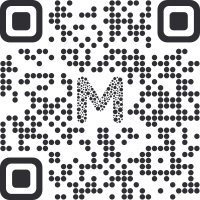 matterapp.com/qr-demo
Tap the code to see what happens next.Point your phone camera here. Takes 3 seconds.
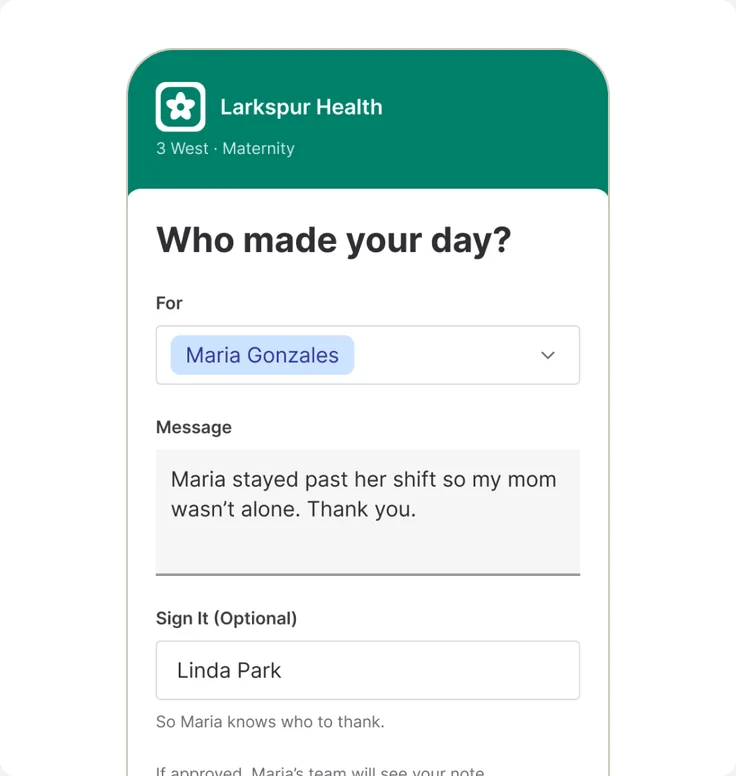
- 2 · Scan and give
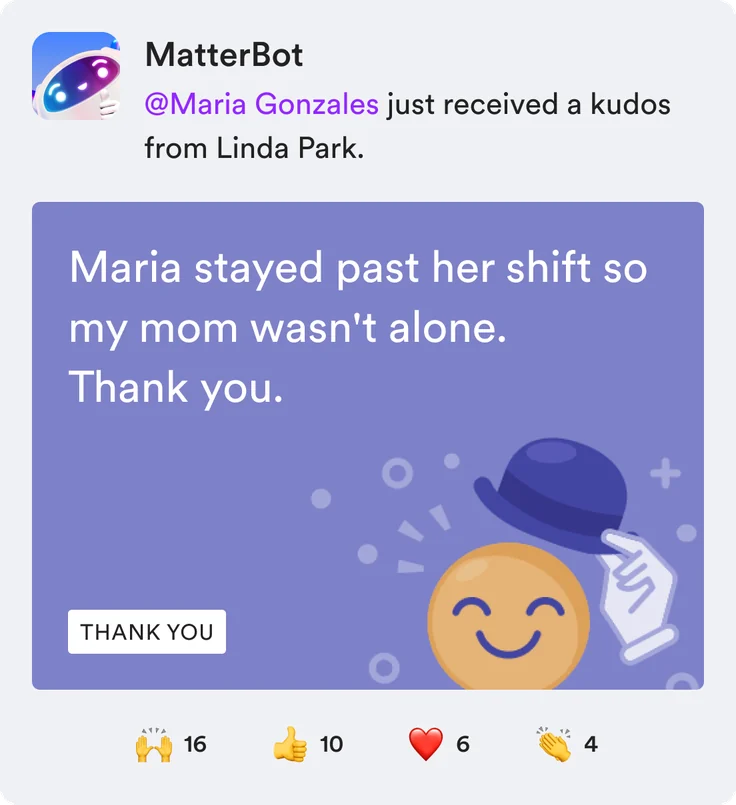
- 3 · Posts to Slack or Microsoft Teams

What are recognition QR codes?
Recognition QR codes from Matter, the employee recognition app for Slack and Microsoft Teams, are printable codes and links that open a short thank you form on any phone. Employee codes let teammates give kudos and confirm who they are in Slack, Microsoft Teams, or by email. Guest codes handle external recognition: customers, patients, and visitors thank your staff with no app and no sign in, and a reviewer approves each note before it posts.

Teammates give kudos in the moment
Put a code where the work happens. A teammate scans it, writes the kudos, and confirms who they are in Slack, Microsoft Teams, or by email. It posts to the channel you chose.

Let customers, patients, and guests say thanks
No app and no sign in. A guest writes a thank you and can sign their name. A reviewer you choose approves it before anything posts, and can add coins.

A link for everywhere a code can’t go
Every code also has its own link at matterapp.com/recognize. Add it to post-visit emails, texts, surveys, and your website. It works just like a scan.

Your brand on every code
Upload your logo and pick your brand color once. Both show on every code and on the page people land on. Matter stays in the background.

Rewards and control in one place
Add Matter Coins people redeem for gift cards, company swag, and donations, or send recognition on its own. See every code in one table, pause or delete one with a click, and try it live before you print.

Frontline employee recognition for hospitals, hotels, retail, and warehouses
Hospitals
Put codes at nurse stations, on patient room whiteboards, and in discharge packets so patients and families can thank staff by name.
Hotels
Put codes at the front desk, on key card sleeves, and in post-stay emails so guests can thank the person who made their stay.
Retail
Put codes at the register, on receipts, and in fitting rooms so shoppers can thank the associate who helped them.
Warehouses
Put codes in break rooms, at time clocks, and in delivery vans so teammates can thank each other every shift.
How recognition QR codes work
Tap the code or scan it from another screen to see a guest’s thank you go from scan to Slack or Microsoft Teams in 13 seconds. No app and no sign in.Scan the code with your phone to see a guest’s thank you go from scan to Slack or Microsoft Teams in 13 seconds. No app and no sign in.
- Print a code or share its link where your team works.
- Anyone scans it with their phone camera.
- They pick who helped and write a thank you.
- It posts to Slack or Microsoft Teams. Guest notes go to a reviewer first.
matterapp.com/qr-demoTap or scan to see itPoint your phone camera here. Takes 3 seconds.
Rolling out QR codes across hospitals, hotels, stores, or worksites?
Tell us where your people work, and in a 15‑minute call we’ll show you branded employee and guest codes with reviewer approval.


Matter has motivated people to participate like no other software we have ever used.

40%
of salary is what it costs to replace one frontline employee (Gallup).
Frequently asked questions
What is QR code employee recognition?

QR code employee recognition is a printed code that opens a short recognition form on any phone. With Matter, an employee code lets teammates give kudos to each other, and a guest code lets customers, patients, and visitors thank staff. Recognition posts to a Slack or Microsoft Teams channel, with optional Matter Coins.
How do recognition QR codes work?
1. An admin creates an employee or guest code and picks the Slack or Microsoft Teams channel it posts to. 2. You print it or share its link where your team works. 3. Someone scans it, picks who helped, and writes a thank you. No app and no sign in for guests. 4. It posts to the channel. Guest notes go to a reviewer first, who can add coins.
Do employees need an app or a company email to give recognition?
No. A teammate scans the code, writes the kudos, and confirms who they are with a Slack or Microsoft Teams direct message, or with an email link. There is nothing to install, and a personal phone works. Nothing posts until the giver confirms.
Can customers or patients recognize staff without an account?
Yes. A guest code opens a form with no app and no sign in. The guest picks who they are thanking, writes a message, and can sign their name. A reviewer you choose approves it before it posts to your team’s channel.
Who approves recognition from a guest code?
The reviewers you pick when you create the code. Each guest message waits for a reviewer, who can fix the recipient, add Matter Coins up to the cap you set, approve it, or decline it. Nothing from a guest code posts without approval. Learn more about approving guest kudos.
Does it work with Slack and Microsoft Teams?
Yes. Recognition QR codes from Matter work the same in Slack and Microsoft Teams. Teammates confirm in a direct message, reviewers get their message where they already work, and approved recognition posts to the channel you chose when you created the code.
What about private or patient details?
Matter is not a place for patient health information. Public pages never show photos, job titles, or last names. Each code has a setting to keep recognition messages out of Slack and Microsoft Teams notifications, and when it is on, the form reminds people to leave out private details. A reviewer sees every guest note before it posts and can decline any note that includes patient details. Learn more about keeping private details out of guest kudos. Matter is SOC 2 Type 2 compliant, follows GDPR and the Data Privacy Framework (DPF), and encrypts data with AES-256. Learn more about Matter security.
Can someone post spam or a fake thank you?
No guest note posts on its own. Every note from a guest code goes to a reviewer you choose, who approves or declines it, and you can pause any code in one click.
Can guests stay anonymous?
Yes. Signing is optional, so a guest can leave their name off. A reviewer still sees every guest note before it posts.
How do guests find the right person on a shared code?
They start typing a name and pick from your people. The list comes from your Slack or Microsoft Teams workspace, so names are always current. A guest can thank more than one person at once.
Where should we put recognition QR codes?
Wherever people already pause. Hospitals: nurse stations, patient room whiteboards, and discharge packets. Hotels and retail: front desks, key card sleeves, table tents, and receipts. Warehouses and fleets: break rooms, time clocks, and delivery vans. Add the link to post-visit emails too. Learn more about where to put your codes.
Do we need a code for every employee?
No. One code per unit, desk, or site covers everyone who works there. Guests start typing a first name and pick who helped.
Can we pause or delete a code?
Yes. Pause a code and anyone who scans it sees that it is turned off, then turn it back on later. Delete a code to retire it for good. Every code lives in one table with its scans.
Which plans include QR Codes?
QR Codes are included on Matter’s paid plans. Create as many codes as you need, for employees or guests, with your Brand Kit on every one. See the Pricing page for plan details, or contact sales about rolling codes out across many locations.