

Short answer: The best Microsoft Teams apps for employee recognition are Matter, Microsoft Praise, Bonusly, Nectar, Awardco, Motivosity and Workhuman, separated by how far past Praise they go.
Praise is free and built in, but stops at 14 titles and a note, with no rewards, values tagging or reporting. Matter and Bonusly are self-serve at published prices, Matter Basic at $1 per user/month, billed annually.
Nectar, Awardco, Motivosity and Workhuman are sales-led platforms for larger programs.
Recognition on Microsoft Teams starts from a different place than it does on Slack, because Teams already has some. The Praise app is built into Teams for any licensed user, so the first question a buyer faces is not which app to install but whether to install one at all.
The second is who is allowed to: third-party apps come from the Teams app store and AppSource, and your tenant’s app permission policies decide whether people can add them, must request them, or only see what an admin has pinned.
Two more details shape the shortlist. Anything beyond sending a thank-you in Praise, such as trends, sits behind a Viva Insights subscription, so the free path has a paid ceiling.
And Matter’s app now works with Microsoft Copilot, which changes what leaders can ask of a recognition tool once it is in the tenant. This page evaluates apps for recognition; our Teams apps for employee engagement page shares some tools but judges them on surveys and listening.
Last verified September 2026.
The short version
The best Microsoft Teams apps for employee recognition let people give, see, and redeem recognition without leaving Teams, and they clear tenant admin approval without a project. Microsoft Praise is free and already there, but it stops at titles and notes: no rewards, no company-values tagging, no admin reporting.
Matter, Bonusly, Nectar, Awardco, Motivosity, and Workhuman all give natively inside Teams; Matter and Bonusly are self-serve, while Nectar, Awardco, Motivosity, and Workhuman are sales-led platforms for larger programs.
If you want Praise’s simplicity plus rewards and reporting at a published price, Matter is the closest fit; if you run a global, budgeted awards program, Workhuman and Awardco are built for that scale.
Quick comparison
| App | Native to Teams | Teams App Store rating | Starting price | Try before you buy | Best for |
|---|---|---|---|---|---|
| Matter | Yes; also native to Slack | 5.0 (1,476 ratings) | Free plan; Basic $1 per user/month, billed annually | 14-day free trial, no card | Rewards, values, and reporting at a published price |
| Microsoft Praise | Built in (Microsoft) | built in, not listed | Included with Teams; trends need Viva Insights | Already on unless blocked | Occasional thank-yous at no cost |
| Bonusly | Yes; also native to Slack | 4.4 (45 ratings) | Free up to 8 users; Team from $3 per user/month | Free tier and trial (30 days) | Points accumulating toward a large catalog |
| Nectar | Native give; rewards in Nectar web app | 4.4 (2,319 ratings) | Not published; contact sales | Demo only | Recognition plus internal comms at scale |
| Awardco | Yes; also on Slack | 4.5 (1,418 ratings) | Not published; small-business packages from $3,000 | No trial | Amazon-backed rewards and service awards |
| Motivosity | Yes (Team Connector); also on Slack | 4.2 (58 ratings) | Custom; $3,000 minimum annual | No trial | Peer bonus budgets at mid-market scale |
| Workhuman | Yes; also on Slack | 4.7 (2,979 ratings) | Not published | No trial | Global enterprise awards programs |
Pricing verified September 2026 against each vendor’s pricing page; ratings from G2 as of September 2026, with Microsoft Teams App Store ratings read by hand from the native ratings widget in August 2026.
How we evaluated these recognition apps
We build Matter, recognition software native to Microsoft Teams and Slack, so read our take on our own product with that in mind.
Praise we have used hands-on in our own Microsoft 365 tenant; every other app was assessed from the vendor’s pricing page, Teams integration docs, and named G2 reviews, so we rely on what each vendor publishes.
We scored each app on five criteria: native give in Teams versus a portal Teams links to; the install and admin-approval path; what the app adds beyond Praise; reporting and rewards depth; and pricing transparency.
Pricing and availability were verified in September 2026 against each vendor’s own pricing page and app listing; ratings are from G2 as of September 2026. Teams App Store ratings are the native ratings on each Microsoft listing, read by hand.
Our own data shapes the weighting. In The Recognition Habit, Matter’s 2026 Benchmark Report, teams that build recognition around a weekly ritual give about 2.5x more recognition per member than ad hoc teams, and roughly 8 in 10 ritual teams stay active in nearly every month.
The platform does not slow the start: almost half of teams (46%) send their first recognition within 15 minutes of setup, 1 in 3 within 5 minutes, and the figures are identical on Slack and Teams. On Teams, two-thirds of the team onboards within the first hour.
Matter’s State of Employee Recognition and Rewards 2026 survey of 1,021 U.S. professionals adds a correlation, and the report calls it exactly that: 47% of people at Teams-first workplaces receive recognition weekly or better, against 39% where email is the only channel and 56% on Slack. Methodology is on our research page.
What to look for in recognition apps for Microsoft Teams
A Teams listing tells you an app exists, not how it behaves in your tenant. Settle these questions before a demo.
- Native give, redeem, and feed. Can people recognize a colleague from a chat, a channel, or the app’s home tab, and redeem rewards there? Nectar gives in Teams but redeems in its web app.
- Tenant admin approval. Nectar lists Microsoft 365 or Teams admin approval as an install requirement, Motivosity says Teams requires standard app approval, and Workhuman expects IT to deploy centrally. Find out who owns app permission policies before you pick a launch date.
- What Praise already covers. Occasional thank-yous, at no cost. Buy an app for what Praise lacks: rewards, values tagging, scheduling, analytics.
- Viva licensing. Praise trends require a Viva Insights subscription; third-party apps carry their own reporting, so the comparison is rarely free versus paid.
- Teams App Store rating. The native rating on the Microsoft listing shows how the Teams app itself performs, separate from G2. Bonusly’s 4.4 across 45 ratings is a thin base; Workhuman’s 4.7 across 2,979 is a strong one.
- Pricing you can read. Four of the six third-party apps below publish no per-user price, which decides who you can pilot with next week.
The best recognition apps for Microsoft Teams in 2026
1. Matter
We build Matter, so weigh this accordingly. Matter is peer recognition, rewards, celebrations, and surveys running entirely inside Teams, with no separate login because Matter’s Teams app syncs user management from Teams.
It installs from AppSource in about two minutes, and leaders and admins can use Matter with Microsoft Copilot to surface recognition activity, celebrations, survey insights, and reward activity through natural language. Feedback Friday™ (US Patent 12,199,935) prompts the team weekly; give-coins reset weekly, earned coins never expire.
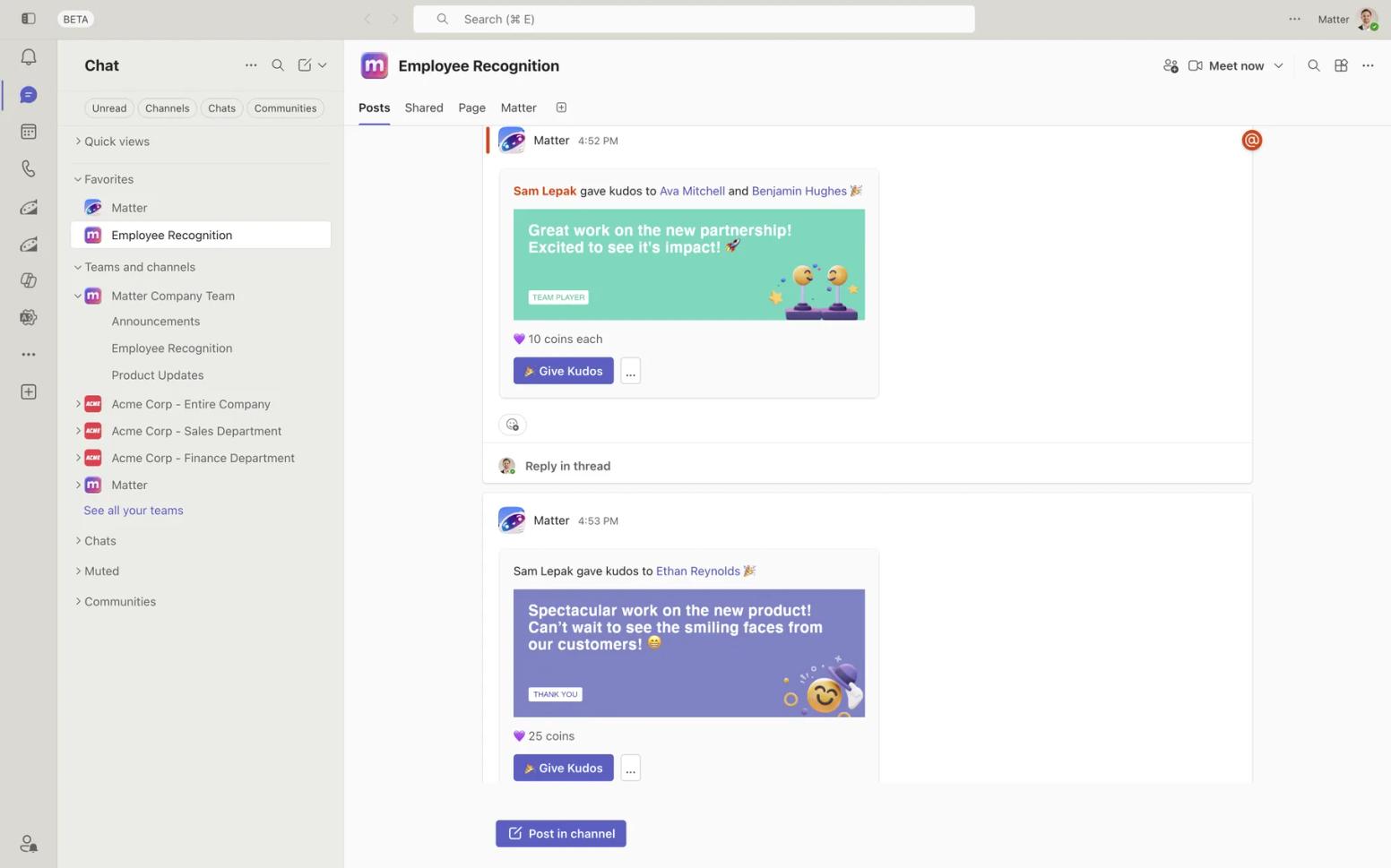
Standout strength: Everything Praise lacks, in the place Praise lives: rewards, custom kudos tied to company values, automated celebrations, and analytics, with a Teams App Store rating of 5.0 across 1,476 ratings.
Watch out for: Rewards, swag, and challenges need Pro, surveys are a paid add-on, and HRIS sync is Enterprise-only. Analytics serve team leads and HR rather than enterprise workforce science; Matter’s G2 reviews give the unfiltered view. A restricted tenant needs an admin to approve the install.
Pricing: Free plan for unlimited users. Basic is $1 per user/month, billed annually; Pro is $3 per user/month, billed annually, adding 10,000+ eGift card options across 200+ countries and company swag (print-on-demand or self-fulfillment); the Surveys add-on is $2 per user/month, billed annually.
Paid plans start with a 14-day free trial, no credit card, and Matter hasn’t raised prices in 8 years. Verified September 2026 on Matter’s pricing page.
Best for: Small teams and mid-size companies on Teams that want rewards, values, and reporting on top of what Praise offers, at a published price.
2. Microsoft Praise
The Praise app in Microsoft Teams is Microsoft’s own recognition feature (there is no product officially named Microsoft Praise; we use the common name).
In a chat or channel, select Actions and apps, choose Praise, pick one of 14 titles such as Courage, Optimism, Kind heart, or Creative, add an optional note of up to 500 characters, preview, and send. The personal feed, six-month history, and self-set reminders live in Viva Insights, which stores Praise data.
We sent Praise in our own tenant in September 2026; it is exactly that simple.
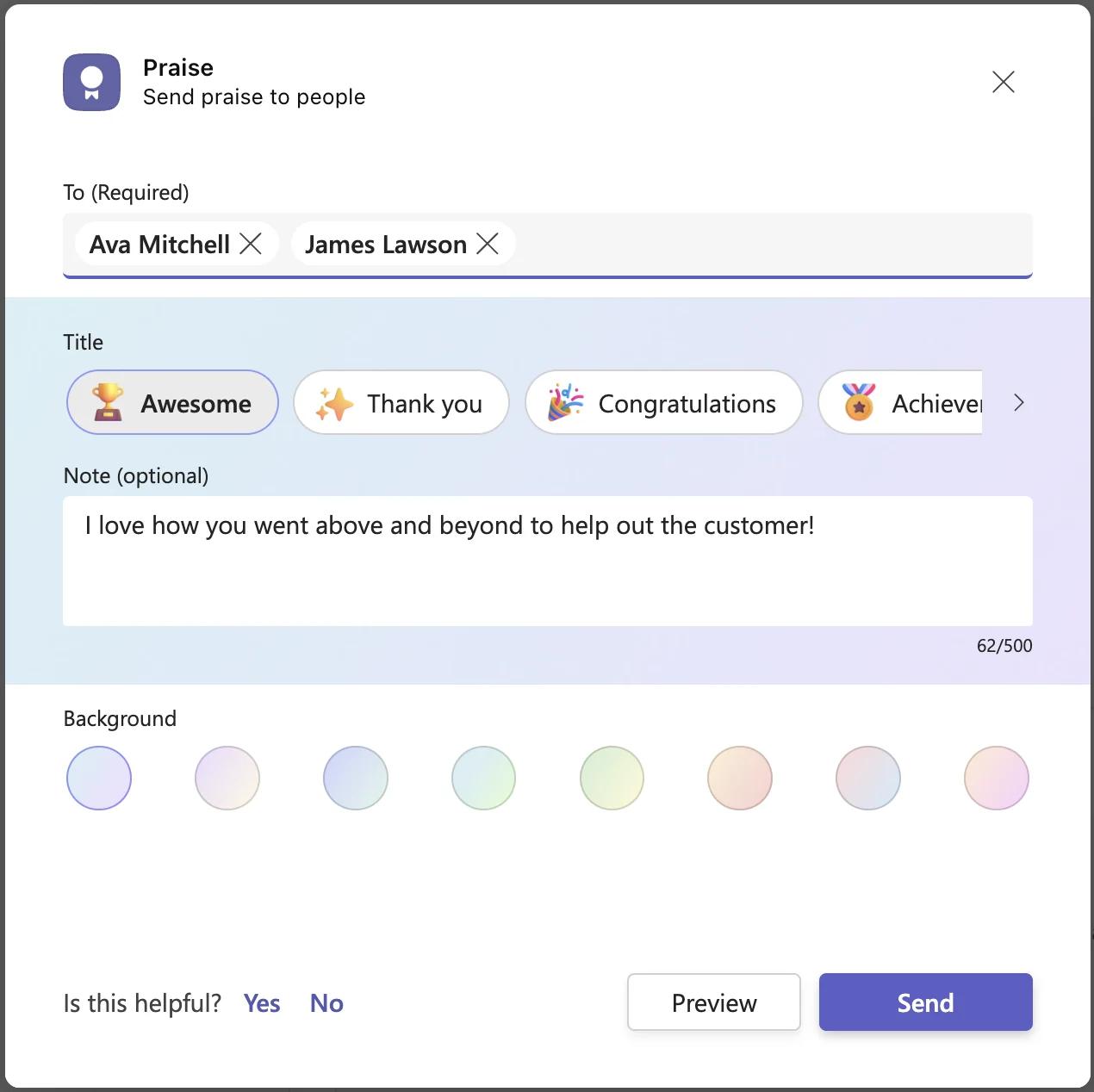
Standout strength: Free, already inside Teams for any licensed user, and controlled by one Allowed or Blocked toggle under Manage apps in the Teams admin center. Nothing to buy.
Watch out for: Microsoft’s documentation describes titles and notes only: no rewards, no custom company-values badges, no scheduling beyond personal reminders, and no admin or team reporting. Praise trends require a Viva Insights subscription, history needs an Exchange Online mailbox, and reminders use one time for every day.
Pricing: Included with Teams; admins must have a Teams license to manage it. Praise trends need Viva Insights at $4.00 user/month, paid yearly (Annual commitment). Verified September 2026. Our Microsoft Praise vs. Matter comparison goes feature by feature.
Best for: Teams that want occasional, unmeasured thank-yous inside Teams at no cost.
3. Bonusly
Bonusly brings its points-and-catalog model into Teams natively: people give, comment, and engage with recognition in a meeting, a chat, search, or the Bonusly Home tab, and typing /bonusly in the search bar opens the give flow.
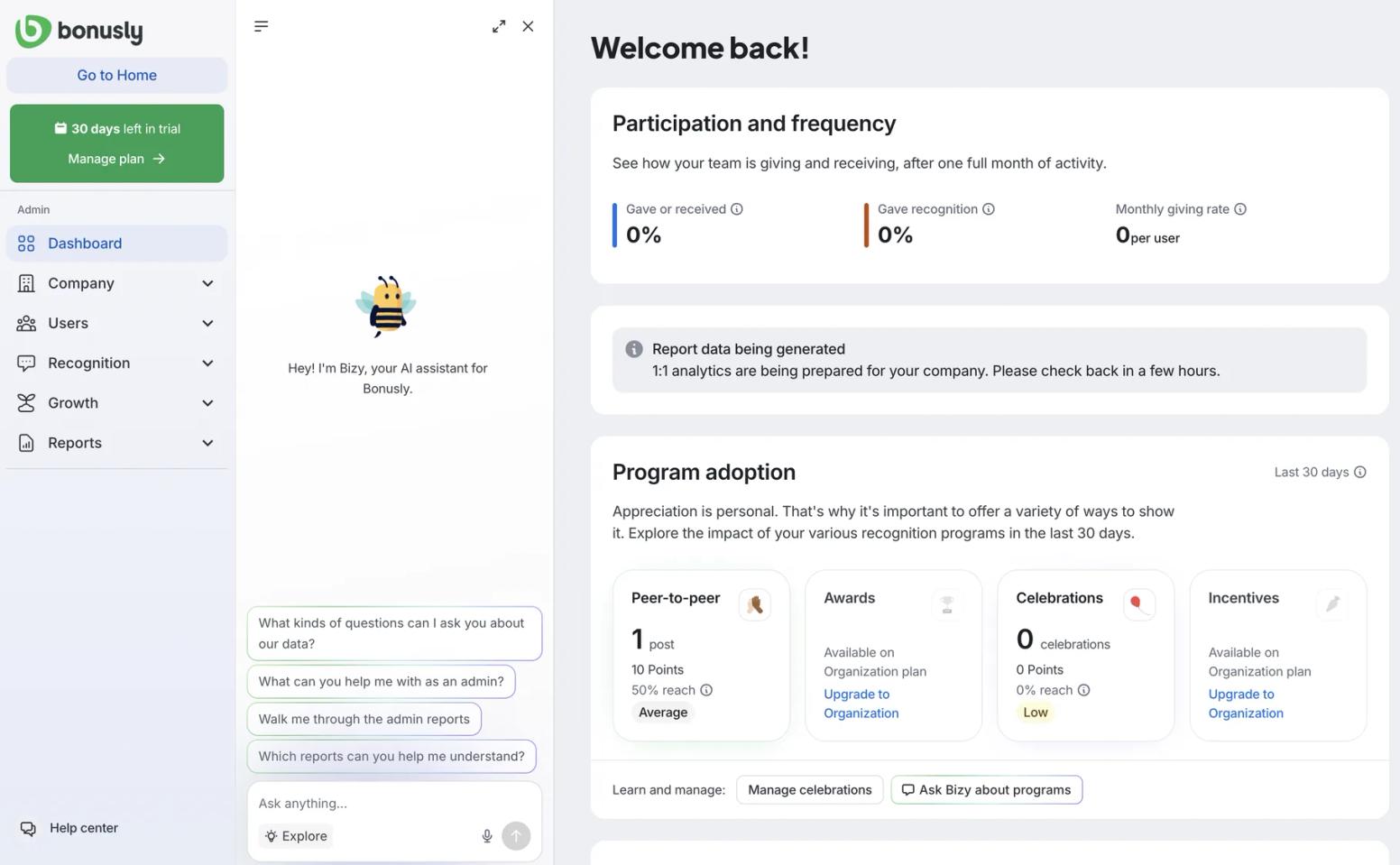
Standout strength: Maturity: 4.7 on G2 across 7,378 reviews. Aisxhel T. (July 2026): “The seamless integration with tools like Slack also makes recognition quick and meaningful instead of feeling like another administrative task.”
Watch out for: The Teams App Store rating is 4.4 across only 45 ratings. Rewards are billed separately, with convenience fees of 8% on pay-as-you-go and 5% on Flex prepaid unless you prepay $2,500 or more. Bianca B. (July 2026): “The monthly points can run out quickly, especially if you want to recognize several teammates.”
Pricing: Free for up to 8 users, including the Teams integration. Team + Bizy is $5 per user/month, or $50 per user/year billed annually; Team without the Bizy AI add-on is $3 per user/month, or $30 per user paid annually; Organization + Bizy is custom. Free trial of 30 days on Team.
Verified September 2026. See our Bonusly vs. Matter comparison.
Best for: Mid-size companies that want points accumulating toward bigger rewards and will fund rewards on top of seats.
4. Nectar
Nectar bundles recognition with internal comms and engagement modules. In Teams, employees send recognition within chats or channels, posts can appear in the channels you select, and people click through to Nectar for full history and rewards. The vendor lists Microsoft 365 or Teams admin approval as an install requirement and estimates setup at 10 to 20 minutes.
Standout strength: Reach: 4.7 on G2 across 8,626 reviews and a Teams App Store rating of 4.4 across 2,319 ratings. Shelby H., a senior manager in people strategy (August 2026): “Nectar makes employee recognition easy, visible, and accessible across our organization.”
Watch out for: No published price and no trial mentioned; every tier routes to a demo. Rewards and history live in the Nectar web app rather than in Teams. Shelby H. also wanted reporting that is “more robust, particularly for organizations that want to evaluate participation, recognition equity, manager engagement, and trends.”
Pricing: Not published; contact sales through a demo request. Verified September 2026. Our Nectar vs. Matter comparison has the detail.
Best for: Mid-size to large companies that want recognition and internal comms in one contract and accept a sales-led purchase.
5. Awardco
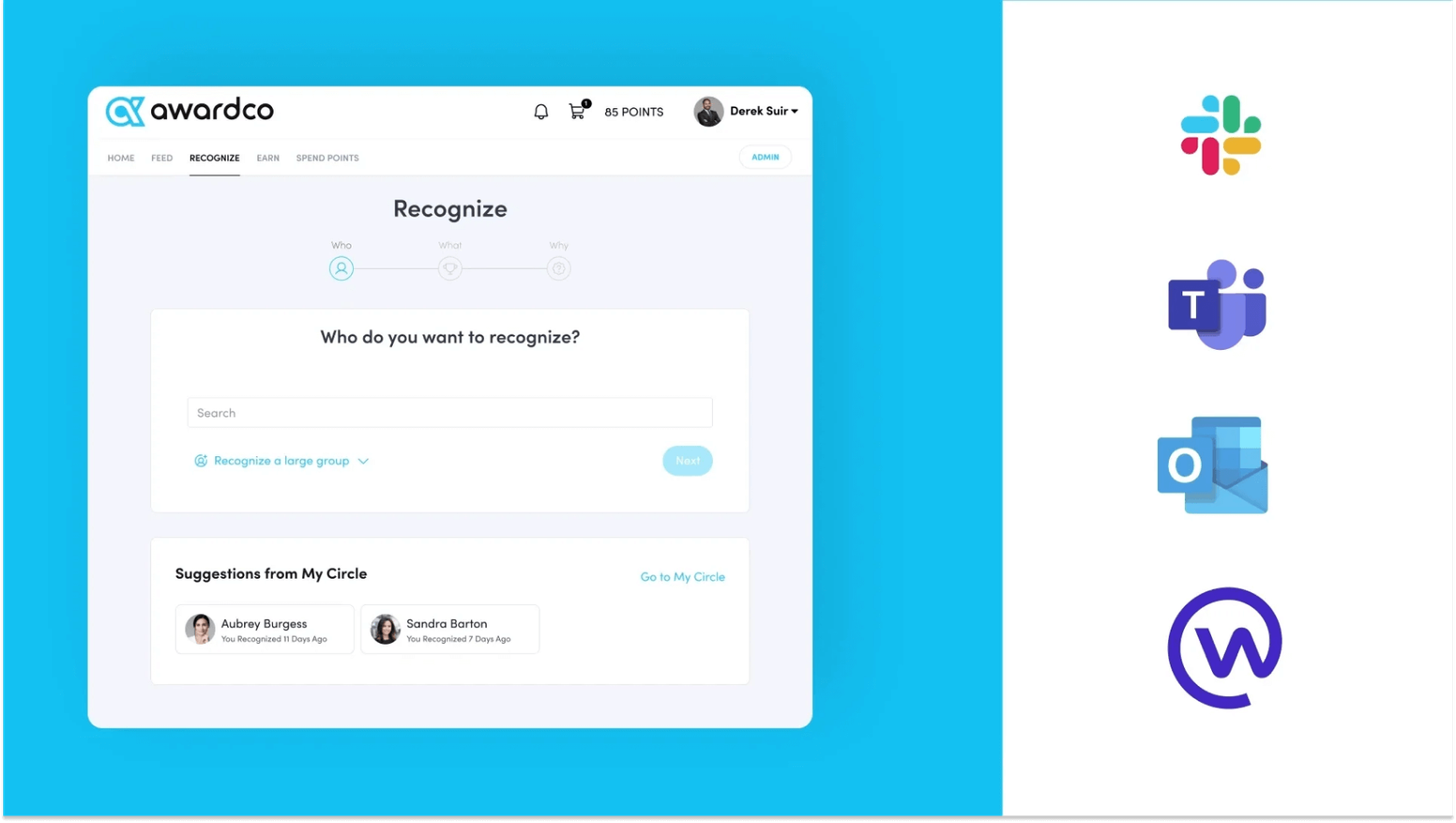
Awardco lets employees recognize each other in Teams, shows the recognition feed directly in Teams, and runs recognition approvals inside Teams as well; reviewers single out redeeming points directly through Amazon. The vendor describes Teams setup as Awardco-assisted with a one-hour setup time.
Standout strength: The rewards network and the numbers: 4.9 on G2 across 6,378 reviews and a Teams App Store rating of 4.5 across 1,418 ratings. Crissy C. (August 2026): “I love that Awardco allows users to access Amazon directly from their platform so we can redeem points immediately.”
Watch out for: No published per-user price and no trial; small businesses of 100 employees or fewer are pointed to packages starting at $3,000. Justin F. (August 2026) asked for “some reminders that my awarding points are gonna expire because I don't seem to get any emails from Awardco.”
Pricing: Not published per user; flexible small-business packages starting at $3,000, everything else contact sales. Verified September 2026. Our Awardco vs. Matter comparison covers the reward economics.
Best for: Mid-size to enterprise organizations that want an Amazon-backed rewards network and service awards under one contract.
6. Motivosity
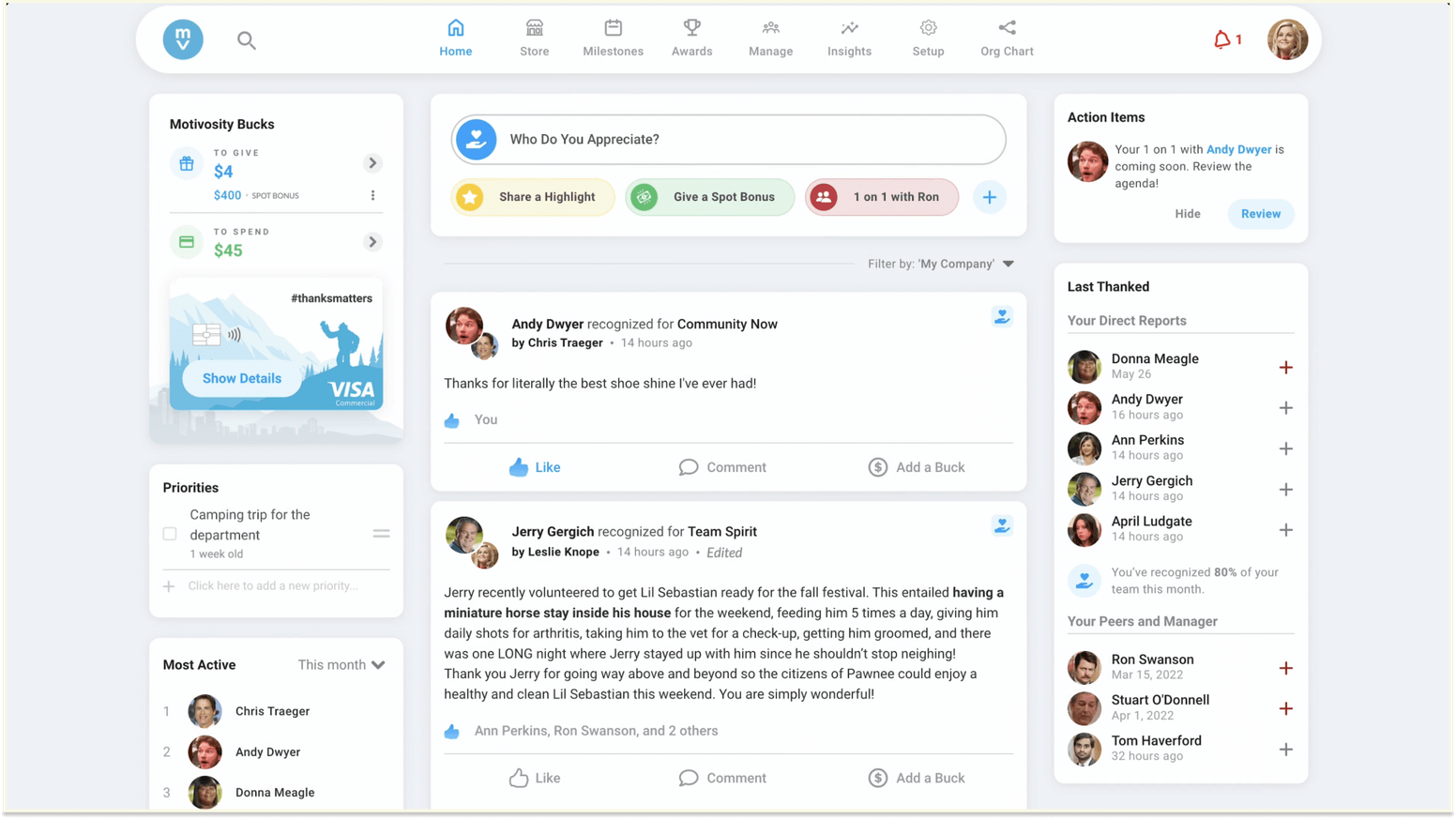
Motivosity runs in Teams as the Motivosity Team Connector, which opens the full platform inside Teams: appreciations, the rewards store, awards, and Spaces. Users need the appropriate permissions to add it, admins can pin it for everyone through Setup policies, and the FAQ notes that Teams requires standard app approval.
Standout strength: Small peer-to-peer monetary bonuses that make appreciation tangible, and a 4.7 on G2 across 3,617 reviews. Nicolas C. (July 2026): “What I like best about Motivosity is that it creates space for genuine connection.”
Watch out for: A Teams App Store rating of 4.2 across 58 ratings, pricing that is 100% custom with a $3,000 minimum annual investment, and no trial. The monthly budget can feel forced: Clayton M. (April 2026) said it “felt like you were just trying to come up with something to compliment someone on, which didn't feel as genuine.”
Pricing: Custom, with a $3,000 minimum annual investment; the pricing page shows ranges by company size rather than list prices. Verified September 2026. See our Motivosity vs. Matter comparison.
Best for: Mid-market companies of 250 or more that want a quote-based recognition and rewards platform with a monthly peer bonus budget.
7. Workhuman
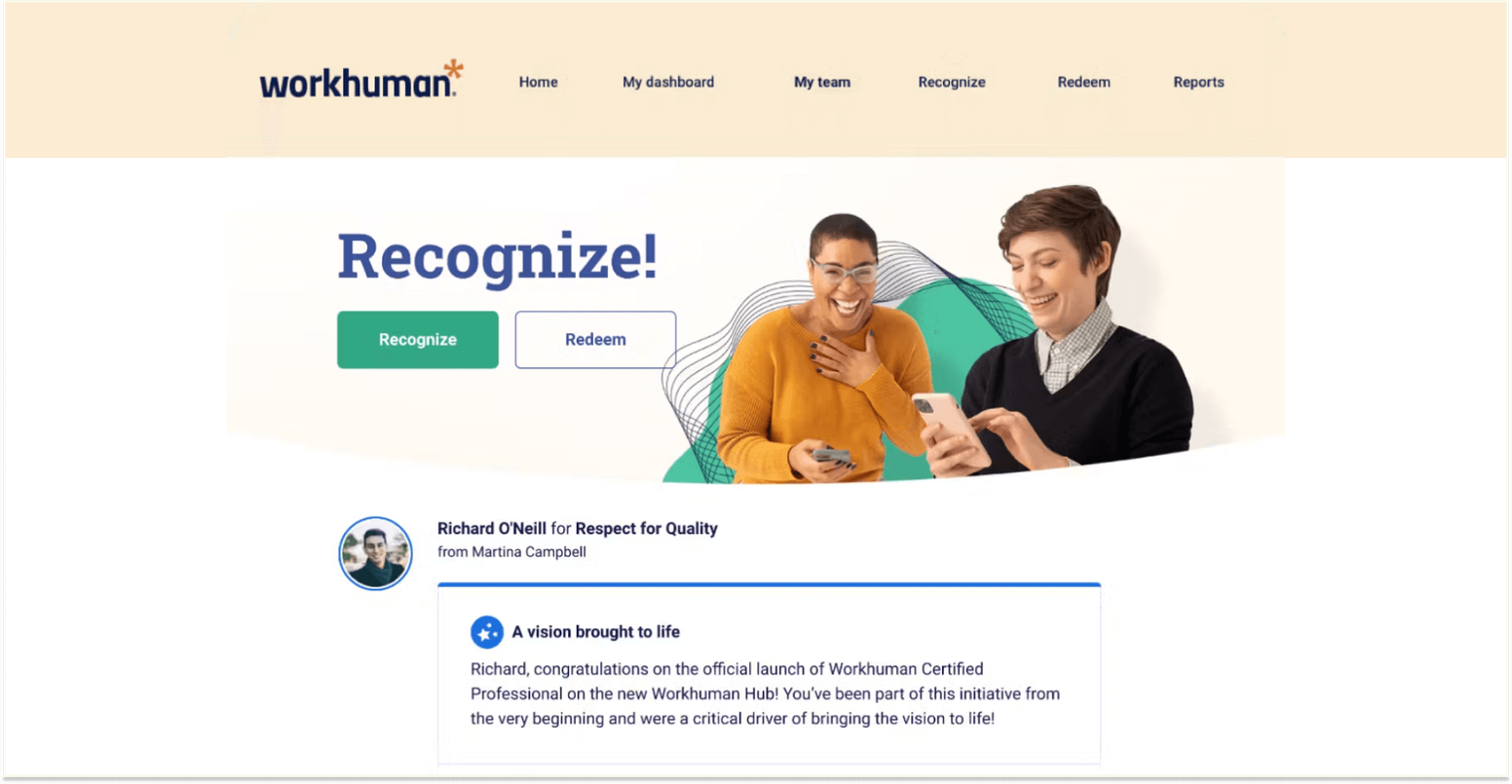
Workhuman is the enterprise option. Its Teams app lets employees send and receive recognition awards, celebrate milestones, see their points balance, and reach the Workhuman Store from inside Teams, with an Award Advisor that guides people on award values. IT can deploy it centrally from the Teams app store or AppSource, and individual users may need to add it themselves.
Standout strength: The strongest Teams App Store showing of any third-party recognition vendor we track, 4.7 across 2,979 ratings, plus 4.7 on G2 across 2,516 reviews. Imani L. (July 2026): “The interface is easy to navigate which makes it widely accessible.”
Watch out for: The vendor states that it does not publicly disclose pricing, offers no trial and no free plan, and describes the Teams app as something Workhuman customers can find in the app store. Awards are taxable points rather than cash; Jason H. (February 2026): “I don't like that it is not cash because it is taxed as such.”
Pricing: Not published; quote via demo request. Verified September 2026. Our Workhuman vs. Matter comparison has more.
Best for: Large enterprises running a global, budgeted awards program with approval workflows.
What it actually takes to get started
Setup time is short everywhere: Matter installs in about two minutes, Nectar estimates 10 to 20 minutes, and Awardco budgets an assisted hour. The variable is your tenant. Teams app permission policies decide whether a user can add a third-party app, must request it, or sees only what an admin has pinned.
If your organization restricts third-party apps, plan on a Teams admin approving the app before anyone gives the first kudos, and ask the vendor what permissions its app requests so that conversation is short. Nectar and Motivosity state that admin approval is part of the install; Workhuman expects IT to deploy centrally.
You do not need an HRIS project to start. Matter has 250+ HRIS integrations available; no HRIS project is required because user management syncs from Slack or Teams, which is the part IT admins tend to ask about first.
For the install and first kudos step by step, see our kudos in Teams training guide, and our roundup of the best Teams apps shows what else tends to sit alongside recognition in a tenant.
How to choose the right recognition app for your team
Start with what Praise does not do for you. If nobody is asking for rewards, values tagging, or a participation report, keep Praise and spend nothing. If those requests exist, size the program.
Under 50 people: Matter’s Free plan or Bonusly’s free tier for up to 8 users gets recognition running without a purchase order.
Between 50 and 500 people: Matter is the lowest published price with rewards and reporting, and Bonusly fits better if you want points that accumulate toward large rewards rather than Matter’s weekly reset.
Above 500, or with a global rewards budget and approval workflows: Workhuman, Awardco, and Nectar are built for that scale and sales process, and Motivosity suits mid-market companies that want a monthly peer bonus budget.
Their Teams App Store numbers, especially Workhuman’s 4.7 across 2,979, show those apps hold up in real tenants.
For the wider category, see our guide to employee recognition software, our companion page on Slack apps for employee recognition, or the combined Slack and Teams roundup if your company runs both.
Frequently asked questions about recognition apps for Microsoft Teams
Why not just use Microsoft Praise?
Praise is free, built into Teams, and fine for occasional thank-yous. It stops there: Microsoft’s documentation describes 14 fixed titles and a note, with no rewards, no custom company-values badges, no scheduling beyond personal reminders, and no admin or team reporting, and Praise trends require a paid Viva Insights subscription.
If you want recognition to become a measured weekly habit with rewards, you need an app on top of Teams; Matter, Bonusly, and the others here add those layers.
Do I need a tenant admin to install a recognition app in Microsoft Teams?
Often, yes. Teams app permission policies decide whether users can add third-party apps themselves, must request them, or only use apps an admin has pinned. Nectar lists Microsoft 365 or Teams admin approval as an install requirement, and Motivosity says Teams requires standard app approval.
In an open tenant a user can add Matter from AppSource in about two minutes; in a restricted one an admin approves it first.
What is the best Microsoft Teams app for employee recognition?
The best Microsoft Teams app for employee recognition gives, shows, and redeems recognition inside Teams and adds what Praise lacks: rewards, values tagging, and reporting. Matter does that at a published price with a Free plan for unlimited users and a 5.0 Teams App Store rating across 1,476 ratings.
Workhuman and Awardco are the better choice for large enterprise awards programs, and Bonusly for accumulating points.
Are there free employee recognition apps for Microsoft Teams?
Yes. Microsoft Praise is included with Teams for any licensed user. Matter has a Free plan for unlimited users that includes kudos and the weekly Feedback Friday prompt, and Bonusly has a free tier for up to 8 users that includes its Teams integration. Nectar, Awardco, Motivosity, and Workhuman have no free plan and are quote-based.
Do recognition apps in Teams require a Viva license?
No. Third-party recognition apps such as Matter, Bonusly, Nectar, Awardco, Motivosity, and Workhuman run in Teams on their own subscriptions and do not need Viva. Viva licensing only matters for Microsoft’s own Praise feature, where sending is free but Praise trends require a Viva Insights subscription and history requires an Exchange Online mailbox.
The bottom line
Praise proves people on Teams will say thank you when it is easy. The apps here exist for what happens next: rewards, values, celebrations, and proof the habit is real. If you want those layers inside Teams at a price you can read, that is what we built Matter to be.
If you want an accumulating points economy, a communications bundle, or a global enterprise awards program, one of the other five is the better choice. Either way, the employee recognition habit that pays off is the weekly one, and our guide to employee recognition programs shows how to build it.


![10 Best Employee Birthday Apps [2026 Pricing & Reviews]](/images/e63481d55b1551a840dfbba106b1cc73befd11a7-800x600.jpg/birthday-apps.jpg?w=800&q=75&fit=max&auto=format)